How Do Credit Usage Notifications Work?
Last updated: April 16, 2026
Gumloop sends email notifications when your credit usage crosses key thresholds — for example, when you've used 75% or 90% of your plan credits. These are configurable from your Subscription settings. You can add, remove, or reset thresholds, and separately toggle "out of credits" notifications on or off.
What Notifications You'll Receive
There are two categories of credit notifications, each configured independently:
Notification Type |
When It Fires |
Example Subject Line |
Credit usage threshold |
When your org's credit usage crosses a percentage you've set (e.g., 75%, 90%) |
"You've used more than 75% of your credits" |
Out of credits |
When your org's credits reach zero |
"You've run out of credits" |
Now using overage credits |
When you've exhausted plan credits and overage is enabled — you've crossed into overage billing |
"You're now using overage credits" |
Overage threshold |
When your overage usage crosses a threshold (if overage is enabled) |
"You've used more than 75% of your overage credits" |
Out of overage credits |
When your overage cap is fully consumed |
"You've reached your overage credit limit" |
Permission group threshold |
When a user's usage within their permission group cap crosses a threshold (Enterprise only) |
"You've used more than 90% of your credits" |
All notification emails come from no-reply@gumloopmail.com and include a link to your Usage & Limits page.
Default Thresholds
If you haven't configured any custom notification rules, Gumloop uses these defaults:
Plan credit thresholds: 75% and 90% — you'll get an email when your org has used 75% and again at 90% of your monthly plan credits.
Overage thresholds (if overage is enabled): 25%, 75%, and 90% of your overage cap.
Out of credits notification: Enabled by default.
These defaults apply until you customize them. Once you add, remove, or change any threshold, the defaults are replaced by your custom configuration.
How to Configure Notification Thresholds
Scroll to the Credit Notification Preferences section.
You'll see two controls:
Out of Credits Notification — a toggle to receive an email when credits reach zero. On by default.
Credit Usage Notifications — a list of percentage thresholds. Each threshold triggers an email when your usage crosses that percentage.
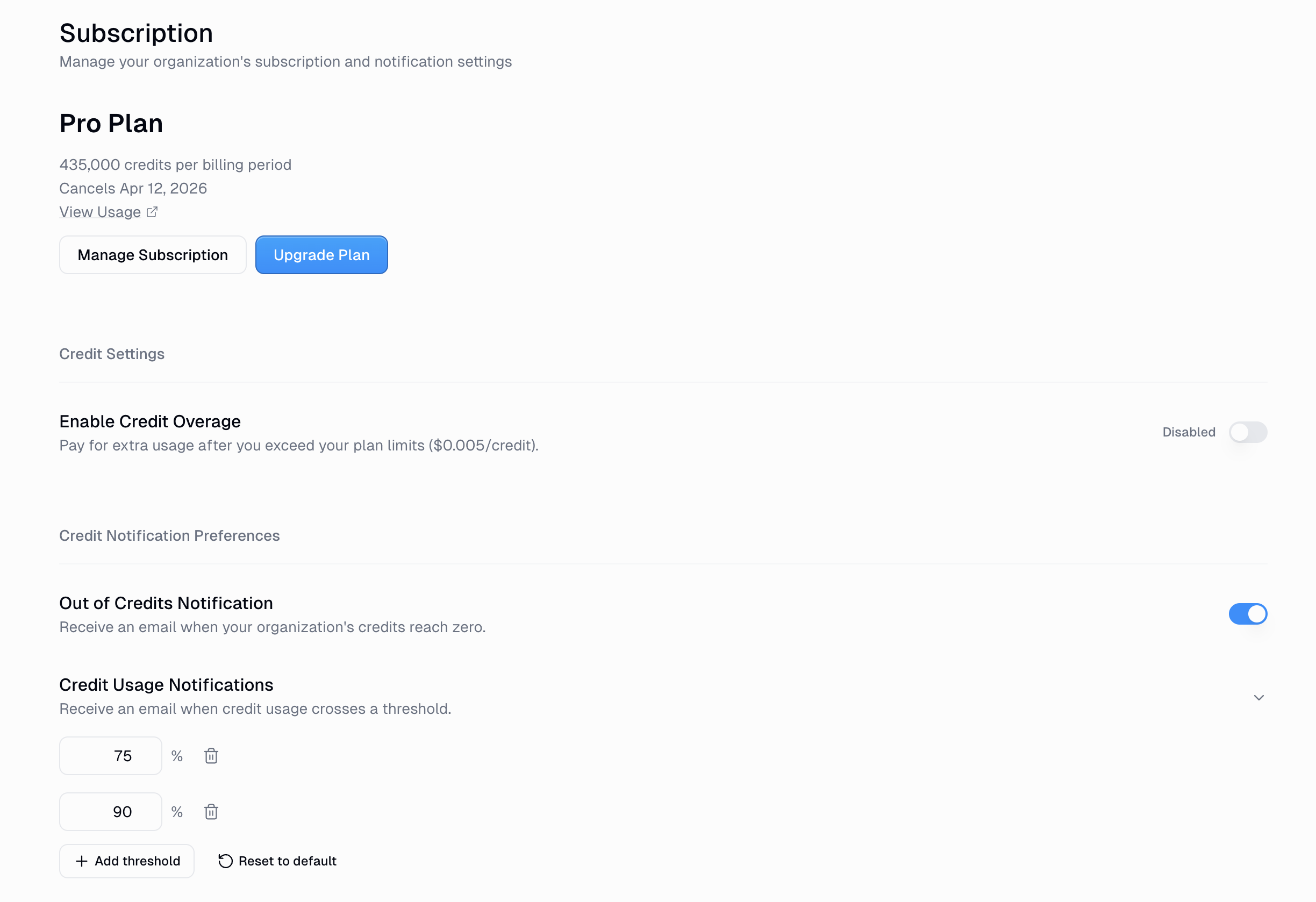
To customize:
Add a threshold: Click + Add threshold and enter a percentage (e.g., 50%).
Remove a threshold: Click the trash icon next to any threshold.
Reset to defaults: Click Reset to default to restore the 75% and 90% thresholds.
Opt out entirely: Remove all thresholds. No percentage-based notifications will be sent (the "out of credits" toggle is separate).
Who Receives These Emails?
Organization-level notifications (credit thresholds, out of credits, overage thresholds) are sent to organization admins and owners.
Permission group notifications (Enterprise only) are sent to the individual user whose usage crossed the threshold within their permission group cap.
FAQ
I deleted all thresholds — will I still get notified?
If you remove all percentage thresholds, you will not receive any usage-based threshold emails. However, if the Out of Credits Notification toggle is still on, you'll still get the "you've run out of credits" email when your balance hits zero. These two settings are independent.
What's the difference between the old "Low Credit Warning" and the new notifications?
The old system sent a single fixed warning when your balance dropped below 20%. The new system lets you set multiple custom thresholds at any percentage you choose. If you previously received emails with the subject "Low Credit Warning" or "Low Credit Warning - Permission Group Limit," those have been replaced by the new configurable threshold alerts.
I have overage enabled — do I get separate notifications for overage?
Yes. Overage has its own set of threshold notifications, separate from plan credit thresholds. You'll also receive a one-time "You're now using overage credits" email when you first cross from plan credits into overage billing. The overage threshold defaults are 25%, 75%, and 90% of your overage cap.
Can I set thresholds in credits or dollars instead of percentages?
The UI currently supports percentage-based thresholds. The underlying system also supports credit-count and dollar-amount thresholds, which may be exposed in a future update.