How Do I Make My Agent's Generated Files Shareable by Default (Without Changing Each One)?
Last updated: June 20, 2026
Set the agent's File Sharing Behavior to "Anyone" in its Chat Preferences so every file and artifact it generates is automatically shareable with anyone who has the link — no need to open each one and change its permissions manually.
How to Set It Up
Open your agent from your agents list and go to the Settings tab.
Scroll to the Chat Preferences section.
Under File Sharing Behavior, open the dropdown and select Anyone (“Shared with anyone who has the link”).
Click Save.
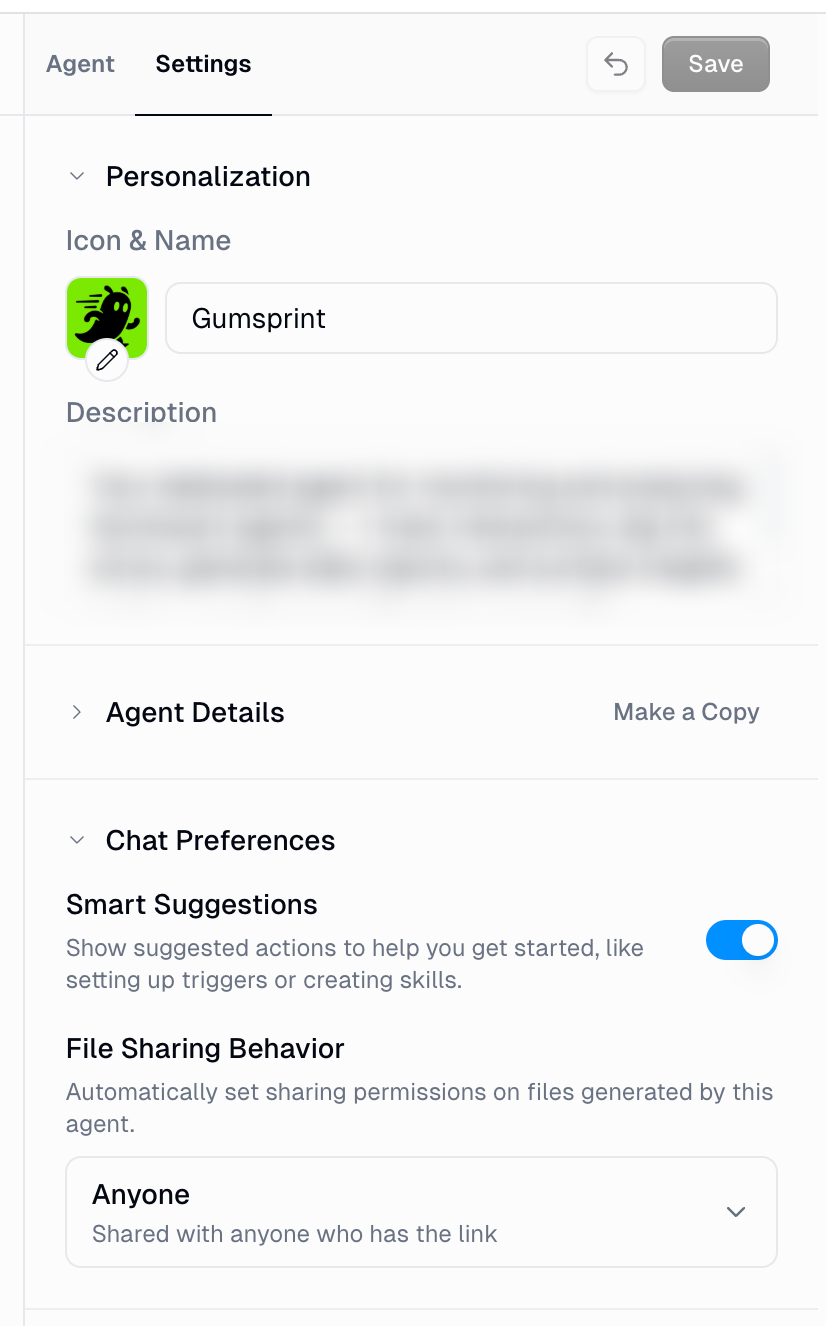
From now on, every new file or artifact this agent generates will be set to anyone with the link automatically (or whatever you set the share settings to), so you can batch-create artifacts and use them right away without touching per-file permissions.
Good to Know
This applies to newly generated files going forward. Files the agent already created keep their existing permissions — change those individually if needed.
The setting is per agent. Turn it on for each agent whose output you want public by default.
The dropdown has three options:
Default — inherits sharing from your chat and agent settings.
Organization — shares new files with everyone in your organization (shown only if your account belongs to an organization).
Anyone — anyone with the link can view and download the file.
If you don't see the Anyone option, an organization admin has restricted external sharing for agent artifacts. Ask your admin to allow it, or use Organization instead.
How Do I Know It Worked?
Generate a new file with the agent, then check its share settings — the access level should already be set to anyone with the link, with no manual change needed.
Still Need Help?
If this didn't resolve your issue, reach out to support at support@gumloop.com.