How Do I Have a Private Agent Chat That Isn't Saved? (Incognito Mode)
Last updated: May 20, 2026
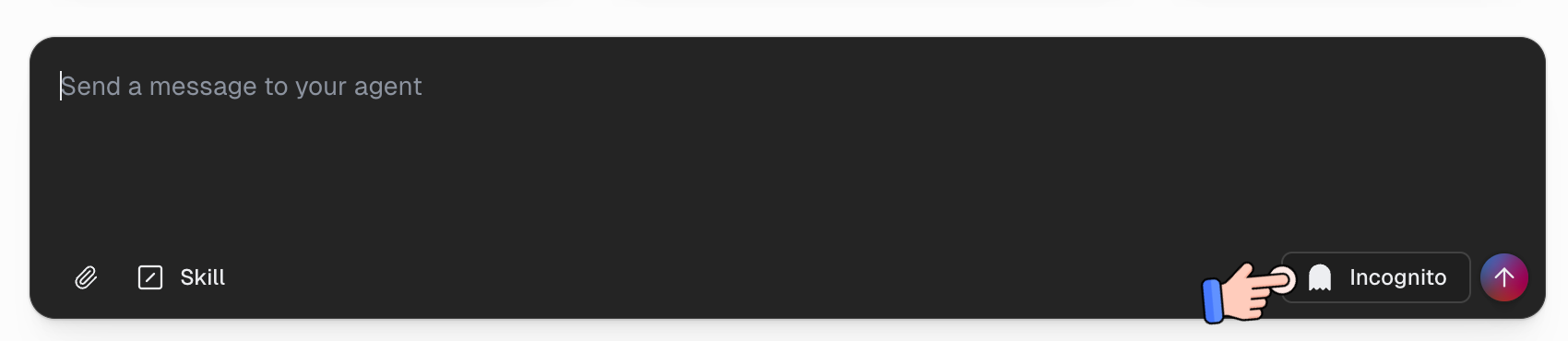
Turn on the Incognito toggle in the chat input bar before sending your first message. Incognito chats aren't saved to the database, don't appear in your chat history, and are permanently deleted after 24 hours.
Before You Start
You must toggle Incognito on before sending the first message in the conversation. Once a chat has started, the toggle is disabled and the conversation can no longer be made incognito.
Incognito chats are non-recoverable. If you need a record of the conversation later, use a standard chat instead.
How to Start an Incognito Chat
Open the agent you want to chat with.
In the chat input bar at the bottom, click the Incognito button (the ghost icon).
Type your message and send it. The whole conversation — and any subagents it spawns — will be incognito.
What's Different in Incognito Mode
Messages aren't saved. They're held only in temporary memory during the conversation.
The chat is hidden from history, the sidebar, search, and data exports. You won't be able to find it again from the chat list.
Files and artifacts are ephemeral. Anything your agent generates (reports, spreadsheets, images) lives in temporary storage only — no permanent artifact record is created.
Subagents inherit incognito automatically. If your agent spawns subagents during the conversation, those subagent chats are also incognito.
The agent doesn't learn from incognito chats. Reflections and self-improvement skip incognito conversations entirely.
Everything is deleted after 24 hours. Messages and files expire and are permanently unrecoverable.
When to Use Incognito Mode
You're testing a prompt or workflow and don't want it cluttering your chat history.
You're sharing sensitive information with the agent that you don't want saved.
You're experimenting with new agent behavior and don't want it influencing future reflections.
When NOT to Use Incognito Mode
You need to reference the conversation later — use a standard chat instead.
You want the artifact your agent generates to be permanent — save a copy elsewhere before the 24-hour window closes, or use a standard chat.
You want the agent to learn from this conversation and improve over time.
Common Questions
I forgot to enable Incognito before sending my first message — can I make this chat incognito now? No. The toggle is locked once the chat has started. Start a new conversation with Incognito enabled from the beginning.
Can I recover an incognito chat after it expires? No. After 24 hours, the messages and files are permanently deleted with no way to retrieve them.
Can I download a file my agent made in incognito before it expires? Yes — download it from the chat before the 24-hour window closes. Once the chat expires, the file is gone.
Does Incognito Mode work for shared agents or only my own? The toggle is available whenever you can chat with the agent. Each user's incognito session is independent.
Still Need Help?
If this didn't resolve your issue, reach out to support at support@gumloop.com.