Does My Agent Remember Things From Previous Conversations?
Last updated: April 10, 2026
Each new conversation starts fresh — your agent does not automatically recall previous chat sessions. However, with the Search Past Conversations tool, your agent can search and retrieve any previous conversation on demand. Combined with skills and self-improving instructions, this gives your agent powerful cross-session memory.
How Conversation Context Works
Within a single conversation, your agent has full context. Every message includes the history of that chat, so the agent remembers everything discussed in the current session.
When you start a new conversation, the slate is wiped. The agent does not carry over messages, files, or sandbox state. This is by design — it keeps conversations fast and avoids loading irrelevant history.
Search Past Conversations (Built-In Tool)
Enable the Search Past Conversations tool to let your agent search and retrieve previous conversations. This is a built-in tool — no integration or API key needed.
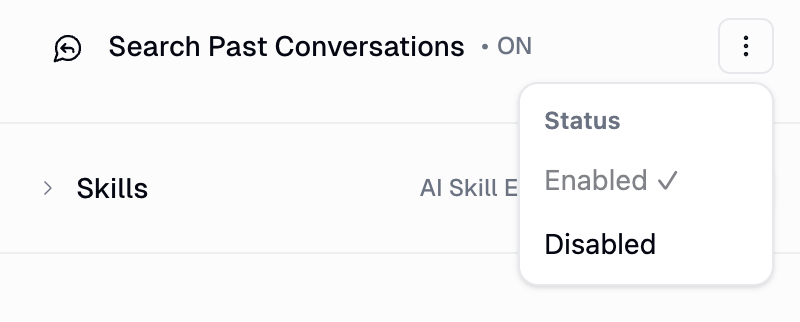
How to enable it
Open your agent's configuration page
Go to the Tools section
Find Search Past Conversations
Use the three-dot menu to enable it
What it can do
Search by keyword — finds past conversations matching your query, ranked by relevance
Retrieve full conversations — loads the complete message history from a past chat for detailed context
Filter by date — narrow searches to specific time ranges (e.g., "conversations from the last week")
Team-wide search — for project/team agents, searches across all team members' conversations, not just yours
Why this is powerful for agent improvement
Search Past Conversations turns your agent into a self-improving system. Try asking your agent:
"Look at the past 10 conversations and find gaps in how you handled requests. Then update your skills or system prompt based on the feedback I provided in those interactions."
"What did we discuss about the Q3 marketing plan?"
"Search past conversations for recurring questions from the team, and create a skill to handle them."
Because your agent can reflect on its own conversation history, it can identify patterns, spot recurring issues, and proactively refine its behavior — creating a feedback loop where every conversation makes the agent smarter.
Other Ways to Carry Knowledge Across Conversations
Skills (Persistent Knowledge Packs)
Skills are reusable knowledge packs your agent can create, update, and load across conversations. When you correct your agent — "don't use that sign-off" or "always check Salesforce first" — the agent can save that correction into a skill so it applies to every future conversation.
Example: "Create a skill called 'email-rules' that remembers: always sign off with 'Thanks', keep emails under 100 words, and CC my manager on anything urgent."
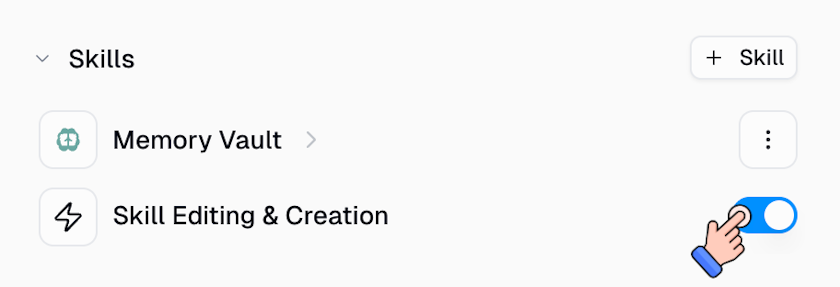
Self-Improve Instructions
When enabled, your agent can automatically update its own system prompt based on feedback you give during conversations. If you say "next time, always ask for the project name first," the agent appends that rule to its instructions for all future sessions.
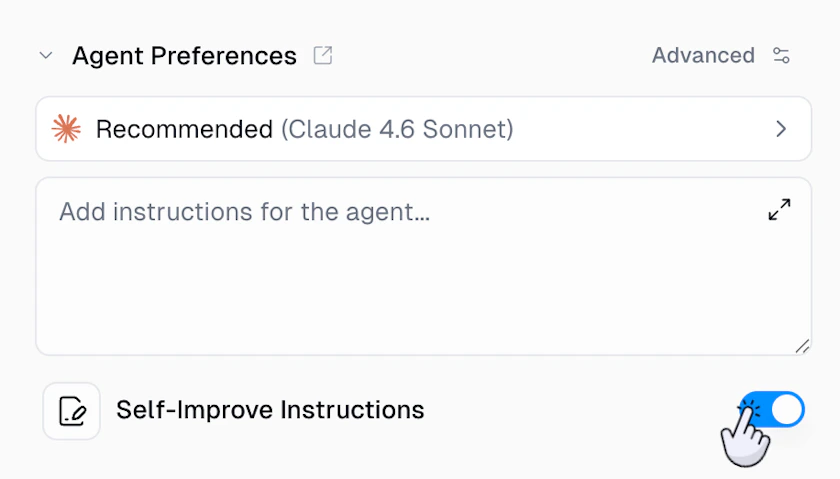
Best Practice: Combine All Three
For agents that genuinely learn from experience, enable all three:
Search Past Conversations — to recall and reflect on what happened
Skills — to store and apply learned knowledge
Self-Improve Instructions — to automatically refine its own behavior
This creates a complete feedback loop: the agent reviews past interactions, identifies improvements, and updates its own skills and instructions — all without manual effort from you.
Related
Agents — Search Past Conversations — full docs on the feature
Agent Skills — creating and managing skills
Agents — full agent configuration reference